



Choosing a test management platform is a strategic decision that affects how quality teams plan, execute, report, and scale their testing practices. Two frequently evaluated options are TestRail and Xray. Both are mature tools used by software teams to bring structure to manual and automated testing, but they differ significantly in architecture, Jira integration depth, reporting style, workflow fit, and overall ownership model.
TLDR: TestRail is a dedicated test management platform that works well for teams needing a standalone, structured, and tool-agnostic testing system. Xray is a Jira-native test management solution best suited for teams that already rely heavily on Jira and want testing embedded directly into their issue workflow. TestRail often feels more independent and test-manager friendly, while Xray offers tighter traceability inside Jira. The better choice depends on whether your organization wants test management to live beside Jira or inside it.
Overview: What TestRail and Xray Are Designed to Do
TestRail is a dedicated test management platform developed to help QA teams organize test cases, manage test runs, track results, and generate reports. It is often used by organizations that want a centralized quality management system independent of any single project management tool. While it integrates with Jira, GitHub, Azure DevOps, and automation frameworks, its core experience is built around test planning and execution.
Xray, by contrast, is a test management app built for Jira. It extends Jira with test-related issue types, workflows, traceability links, and reporting. Instead of managing tests in a separate application, Xray allows teams to define test cases, test plans, test executions, and requirements directly within Jira. For organizations already standardized on Atlassian products, this can be a powerful advantage.
The distinction is important: TestRail is a specialist testing platform that integrates with Jira, while Xray turns Jira into a test management environment. This difference shapes nearly every aspect of the user experience.
Ease of Use and User Experience
TestRail has a clean, purpose-built interface focused specifically on test management. Test cases, test suites, milestones, runs, and results are easy to understand, especially for QA professionals familiar with traditional test management concepts. Its structure is intuitive for teams that think in terms of test repositories, execution cycles, and release-based validation.
Xray’s user experience depends heavily on users’ familiarity with Jira. For teams already comfortable with Jira issues, workflows, filters, boards, and permissions, Xray can feel natural. However, because it operates inside Jira, some users may find the experience more complex. Test cases become Jira issue types, and test management activities are influenced by Jira configuration, schemes, and project settings.
For QA teams that want a dedicated workspace, TestRail is generally easier to adopt. For cross-functional agile teams that live in Jira all day, Xray may reduce context switching.


Jira Integration and Workflow Alignment
Jira integration is one of the most important comparison points. TestRail provides solid Jira integration, including linking test cases and results to Jira issues, viewing test coverage, pushing defects to Jira, and maintaining traceability between testing and development work. This is sufficient for many teams, particularly when QA and development use different tools but need synchronized information.
Xray’s Jira integration is deeper because Xray is built directly into Jira. Requirements, stories, bugs, test cases, test executions, and test plans can all exist as Jira issues. Teams can use Jira filters, dashboards, permissions, notifications, custom fields, and workflows to manage the testing lifecycle. This creates strong traceability from requirements to tests to defects without leaving Jira.
However, deep integration also means deeper dependency. Xray’s effectiveness depends on the quality of your Jira configuration. A poorly structured Jira instance can make Xray harder to maintain. TestRail, being separate, can provide cleaner test organization even when Jira projects are complex or inconsistent.
Test Case Management
TestRail offers a mature test case repository with sections, templates, custom fields, priorities, preconditions, steps, expected results, and reusable structures. It is well suited to teams with large test libraries or formal QA processes. Managing regression suites, versioned test plans, and release-specific test runs is straightforward.
Xray also supports test case management, but in a Jira-centric way. Tests are typically represented as Jira issues, which means they can use Jira workflows, labels, components, and links. This is valuable when tests must be closely connected to requirements and user stories. It also makes it easier for developers, testers, product owners, and managers to collaborate in one system.
The trade-off is that Jira was not originally designed as a test repository. With Xray, teams must be disciplined about issue naming, fields, project structure, and permissions to avoid clutter. TestRail provides a more specialized environment for keeping test assets organized at scale.
Manual Testing Capabilities
Both platforms support manual testing effectively. TestRail provides test runs that allow testers to execute cases, mark statuses, add comments, attach evidence, and log defects. Its execution interface is practical and efficient, especially for regression testing and structured validation cycles.
Xray supports manual test execution through Jira-based test execution issues. Testers can record step-level results, attach evidence, and link defects. Because everything is inside Jira, stakeholders can quickly see testing status alongside development progress. This can be especially useful in agile sprint environments where visibility is critical.
If your manual testing process is formal and test-case-heavy, TestRail may feel more comfortable. If your manual testing is closely tied to user stories and sprint-level delivery, Xray may be a better operational fit.
Automation Support
Modern QA teams increasingly need test management platforms that support automated testing. TestRail offers APIs and integrations that allow automated test results to be uploaded from frameworks such as Selenium, Cypress, Playwright, JUnit, TestNG, and others. Teams can connect automation pipelines to TestRail and maintain visibility into automated and manual results in one location.
Xray also provides strong automation support, particularly for teams using CI/CD pipelines connected to Jira. It can import results from common formats such as JUnit, NUnit, Cucumber, and Robot Framework. Xray is especially strong for behavior-driven development because of its support for Cucumber and Gherkin-style specifications.
In practice, both tools can handle automated test reporting. The choice depends on whether your team wants automation results consolidated in a standalone QA platform or attached directly to Jira issues and releases.

Reporting and Analytics
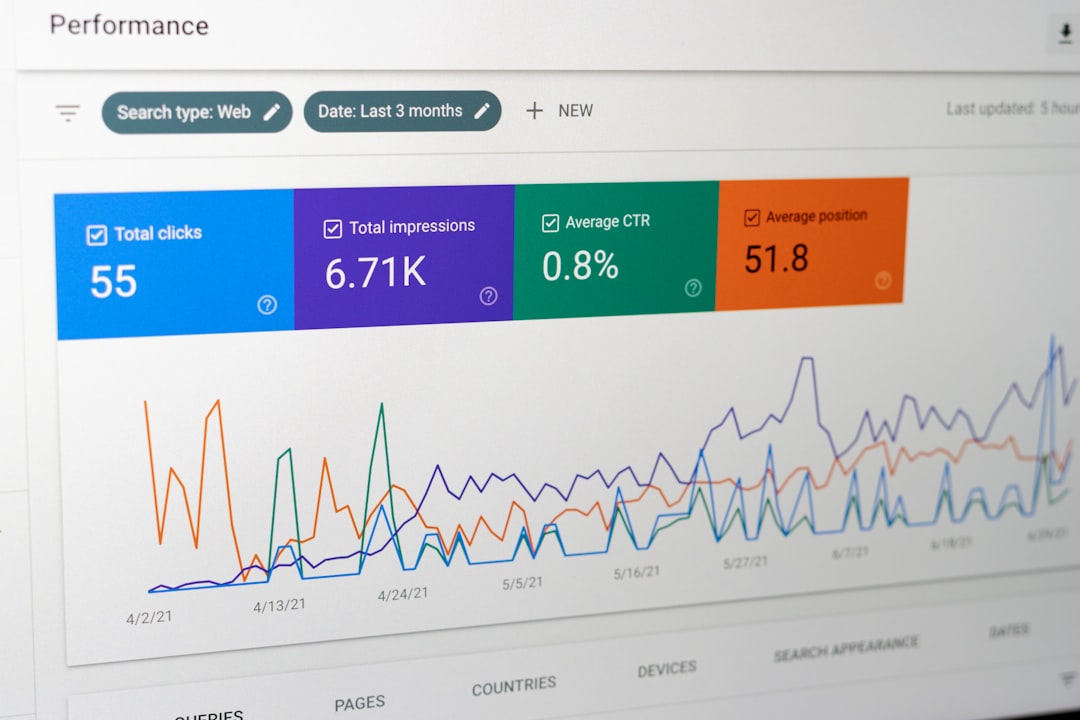
TestRail provides dedicated QA reporting, including test run summaries, defect distribution, coverage reports, workload views, milestone progress, and historical results. Its reports are designed for QA managers who need to assess execution progress, identify risk, and communicate release readiness.
Xray reporting benefits from Jira dashboards and gadgets. Teams can create visualizations that combine testing data with development data, such as requirement coverage, defect trends, test execution status, and sprint health. This is valuable for leadership teams that want one source of truth inside Jira.
TestRail’s reporting is often more straightforward for QA-specific management. Xray’s reporting is more integrated with broader agile delivery metrics. Organizations should evaluate not only the available reports but also who consumes them: QA leads, engineering managers, product owners, compliance teams, or executives.
Traceability and Compliance
Traceability is a major strength for both tools, but they approach it differently. TestRail links requirements, test cases, runs, results, and defects through integrations. It can support audit-friendly processes when configured carefully, especially for teams that need documented evidence of testing activities.
Xray provides powerful native traceability within Jira. Since requirements, tests, executions, and defects can all be Jira issues, relationships are easily represented and reviewed. This can be particularly useful in regulated environments where organizations need to prove that each requirement has been tested and that failed tests are linked to defects.
For companies in industries such as finance, healthcare, aerospace, or enterprise software, both platforms can be viable. Xray may offer stronger Jira-based traceability, while TestRail may offer clearer separation and governance of formal test assets.
Scalability and Administration
TestRail scales well for QA organizations managing multiple projects, releases, teams, and test repositories. Administration is relatively focused because the platform is designed specifically for testing. Permissions, templates, custom fields, and project structures can be managed without requiring broad Jira administration knowledge.
Xray scalability is closely tied to Jira scalability. Large Jira instances with many projects, custom workflows, issue types, and permissions may require careful governance. Xray can scale effectively, but it often needs experienced Jira administrators to maintain consistency and performance.
This makes TestRail appealing for QA departments that want control over their own test management system. Xray is appealing for organizations that already have strong Jira administration practices and want testing to align with enterprise Jira standards.
Pricing and Total Cost of Ownership
Pricing can vary depending on deployment type, user count, licensing model, and enterprise requirements. TestRail is typically licensed as a dedicated test management product. Costs are relatively easy to understand because the platform is purchased specifically for QA and testing users.
Xray pricing is connected to the Atlassian ecosystem. Organizations must consider Jira licensing in addition to the Xray app license. For teams already paying for Jira, Xray can be cost-effective because it extends an existing platform. However, if many users need Jira access only to participate in test management, the total cost may increase.
The true cost is not only license fees. Implementation, configuration, training, migration, reporting setup, and ongoing administration should all be considered. A tool that fits your workflow naturally will usually be less expensive to maintain over time.
Strengths of TestRail
- Dedicated test management experience: Built specifically for QA planning, execution, and reporting.
- Strong test repository organization: Suitable for large libraries of manual and automated tests.
- Tool-agnostic flexibility: Integrates with Jira and other development tools without depending entirely on them.
- Clear QA reporting: Useful for test managers, release managers, and quality leads.
- Simpler adoption for QA teams: Less dependent on Jira configuration and administration.
Strengths of Xray
- Native Jira experience: Testing activities are embedded directly in Jira projects and workflows.
- Excellent traceability: Requirements, tests, executions, and defects can be linked within one system.
- Strong agile alignment: Works well for teams managing testing inside sprints and releases.
- Good automation support: Especially effective for CI/CD and BDD-style testing workflows.
- Centralized collaboration: Developers, testers, and product owners work in the same environment.
Potential Limitations
TestRail’s main limitation is that it is a separate platform. Even with strong integrations, some teams may experience context switching between TestRail, Jira, CI/CD tools, and documentation systems. Organizations that want everything inside Jira may find TestRail less aligned with their operating model.
Xray’s main limitation is complexity. Because it depends on Jira, its success is closely connected to Jira design and governance. Teams with messy Jira configurations may struggle to keep test management clean and intuitive. Additionally, non-technical testers or external stakeholders may find Jira-heavy workflows less approachable.
Which Platform Is Better for Your Team?
Choose TestRail if your organization wants a dedicated test management platform with strong QA-centric workflows. It is especially suitable for teams with formal testing processes, large regression suites, multiple products, or a need for structured reporting outside Jira. TestRail is also a strong choice when QA teams require autonomy from development tooling.
Choose Xray if your organization is deeply invested in Jira and wants testing to be part of the same workflow as requirements, development, and defect tracking. It is particularly effective for agile teams, DevOps environments, and organizations that prioritize end-to-end traceability within Jira.
There is no universal winner. TestRail is often better as an independent QA command center, while Xray is often better as a Jira-native quality extension. The right decision depends on your team structure, compliance needs, reporting expectations, automation strategy, and willingness to manage Jira configuration.
Final Verdict
TestRail and Xray are both credible, enterprise-ready test management solutions. TestRail offers clarity, independence, and a purpose-built testing experience. Xray offers deep Jira integration, strong traceability, and agile workflow alignment. A serious evaluation should include a pilot with real test cases, actual Jira projects, automation results, and reporting requirements.
For organizations where QA operates as a specialized discipline with its own processes, TestRail is likely to provide better structure and control. For organizations where quality is fully embedded in Jira-based delivery, Xray is likely to provide better continuity and collaboration. The best platform is the one that supports how your team truly works, not merely the one with the longest feature list.